Problem
How do I provide ‘Self Service’ profile users with access to attachments?
Resolution
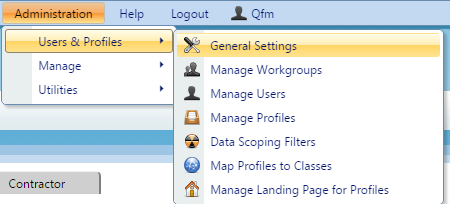
This is done via ‘General Settings’ within the Administration Tab on QFM Web. To change these settings you must first login as an Administrator on QFM Web.
- Navigate to ‘General Settings’.

- Select the User Class you wish to change the settings for, using the dropdown at the top of the page. If you want to change the settings for Self Service select ‘Self Service’.

- Navigate to ‘General Event Logging’; the main setting for attachments is called ‘Allowed to view attachments’ and there are also additional settings for attachments here.
- When you want to save your changes scroll to the bottom of the page and click ‘Apply Settings’.